Choose any ESP32 board with R1BBIT Firmware.
Connect the SCD41 CO₂, temperature, and humidity sensor, the BMP280 temperature and pressure sensor, and the SSD1306 OLED display to the I²C port.
Open the R1BBIT Cloud platform
Write a simple script.
CONFIG
// ==========================================================
// I2C Configuration
// SCD41, BMP280 and SSD1306 share the same I2C bus
// ==========================================================
I2C_SDA 21
I2C_SCL 14
I2C_FREQ 400000

// ==========================================================
// OLED Display Configuration
// 128x64 SSD1306 I2C OLED display
// ==========================================================
DISPLAY_DRIVER   SSD1306
DISPLAY_I2C      0
DISPLAY_I2C_ADDR 0x3C
DISPLAY_WIDTH    128
DISPLAY_HEIGHT   64

// Use Imperial measurement units
// Temperature: °F
// Atmospheric pressure: inHg
UNITS IMPERIAL
END_CONFIG

// ==========================================================
// Variables
// CO2 - CO2 concentration in ppm
// T   - Temperature from SCD41
// H   - Relative humidity from SCD41
// P   - Atmospheric pressure from BMP280
// TP  - Temperature from BMP280
// PMM - Atmospheric pressure converted to mmHg
// ==========================================================
VAR CO2,T,H,P,TP,PMM

// Publish sensor values to R1BBIT Cloud
VARS_PUBLISH(CO2,T,H,P,TP,PMM)

// Initialize the SCD41 CO2, temperature and humidity sensor
// Sensor values are updated every 5 seconds
SCD41_INIT(CO2,T,H,5000)

// Initialize the BMP280 temperature and pressure sensor
// Sensor values are updated every second
BMP280_INIT(TP,P,1000)

// Initialize the OLED display
DISPLAY_INIT

// Clear the display
DISPLAY_CLEAR(0)

WHILE 1
    // Convert atmospheric pressure from inHg to mmHg
    PMM=P*25,4
    // Display CO2 concentration
    DISPLAY_TEXT(0,0,"CO2:  "+CO2+"ppm",#FFFFFF)
    // Display temperature in degrees Fahrenheit
    DISPLAY_TEXT(0,16,"Temp: "+T.1+" F",#FFFFFF)
    // Display relative humidity
    DISPLAY_TEXT(0,32,"Hum: "+H.1+"%",#FFFFFF)
    // Display atmospheric pressure in inches of mercury
    DISPLAY_TEXT(0,48,"P: "+P.1+" inHg",#FFFFFF)
    // Print atmospheric pressure in mmHg to the terminal
    PRINT PMM
    // Refresh the OLED display
    DISPLAY_UPDATE
    // Wait 2 seconds before the next screen update
    PAUSE 2000
    // Clear the display before drawing the next frame
    DISPLAY_CLEAR(0)
WEND
Click Upload to Device → Script Start.
Result:
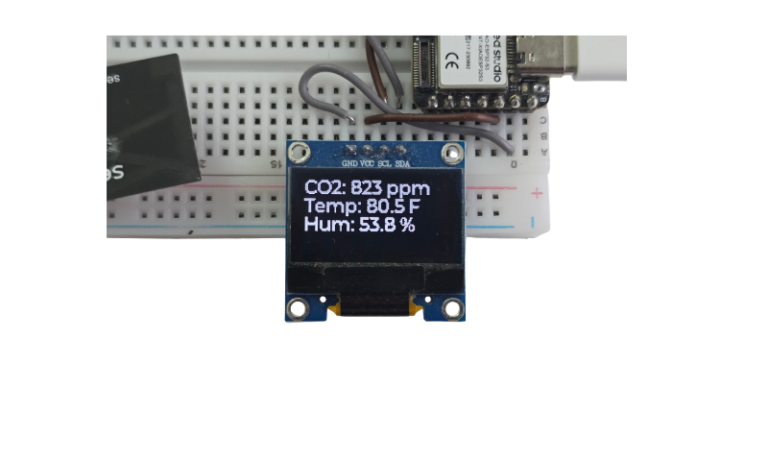
The OLED display shows CO₂ concentration in ppm, temperature in Fahrenheit, humidity in percent, and atmospheric pressure in inHg, updated every 2 seconds.
The sensor data is also published to R1BBIT Cloud and can be viewed in the online terminal.