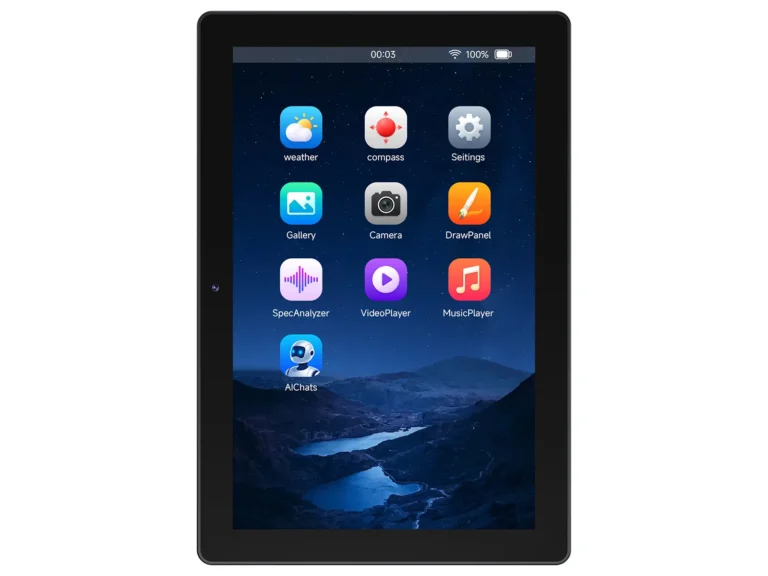
Go from a blank ESP32 to a device that streams to your phone in one sitting — plain-language scripts instead of C, no toolchain, no server of your own, no rebuilds. Quick enough to test an idea, simple enough for a first lesson.
First flash from the browser over USB. After that, everything is over the air.
R1BBIT turns an ESP32 board into a finished connected device — with no toolchain, no server of your own and not a line of C.
Three kinds of work suit it especially well: getting a product to its first working version fast, testing whether an idea holds up before you commit to building it properly, and learning electronics and robotics — that last one above all if you are starting from scratch.
The boards in our catalog are hardware we have verified by hand, but the ecosystem runs on almost any ESP32.
The firmware carries an interpreter, so the board runs a plain text file instead of a compiled binary. Its 298 commands cover pins, sensors, displays, sound, camera and networking — no C, no toolchain, no compiling.
Write in the browser with autocomplete for every command and a checker that catches mistakes as you type. An assistant can write or fix the script for you, and a gallery of ready examples saves you the blank page. Even the very first flashing happens here, over a USB cable.
Boards connect to it on their own over an encrypted channel. Readings are kept and drawn as charts, new scripts and firmware arrive over the air, and every device has a console and a file browser you can open from anywhere.
A value the board publishes becomes a tile on your phone; move a slider there and the board reacts. The app also carries the editor, the console, the documentation and the same assistant — and it can ring you when something goes wrong.
CONFIG
PSRAM_SIZE 8
PSRAM_TYPE OCTAL
I2C_SDA 16
I2C_SCL 15
SPI_MOSI 11
SPI_MISO 13
SPI_CLK 12
DISPLAY_DRIVER ILI9341
DISPLAY_CS 10
DISPLAY_DC 46
DISPLAY_BL 45
DISPLAY_WIDTH 320
DISPLAY_HEIGHT 240
TOUCH_DRIVER FT6x36
TOUCH_INT 17
END_CONFIG
DISPLAY_INIT
DISPLAY_WIDGET(1, "label", 20, 24, 280, 36)
DISPLAY_WIDGET(2, "arc", 90, 76, 140, 140)
VAR T, F
VAR A[1]
DS1820_INIT(A, 1000)
VARS_PUBLISH(T, F)
WHILE(1)
T = A[0]
F = T * 9 / 5 + 32 ' to Fahrenheit
UI_TEXT(1, "Temperature " + T + " C")
UI_VALUE(2, T)
IF T > 30 THEN SEND_NOTIFY("Greenhouse", "Too hot: " + T)
PAUSE 1000
WEND
The web flasher writes the firmware from the browser over USB. No toolchain, no drivers to hunt for.
In the web IDE or the mobile app — with autocomplete, inline parameter hints and a linter that checks argument types as you type.
Press Run and the script is on the board in seconds — over the air, over an encrypted link, no cable. It can also come from an SD card or the console. The board keeps it in flash, and AUTOSTART runs it again on the next power-up.
Now you can see it working: readings reach the dashboard and your phone about once a second, and the terminal shows whatever the script prints. Something wrong — fix the line and send it again. Meanwhile the board keeps gaining commands, because firmware updates arrive over the air too.
If you came to ESP32 through the Arduino IDE, you know the price of every change: recompile, plug in the cable, reflash, repeat until the logic settles. Blynk and Arduino Cloud hand you a dashboard and a cloud, but the logic underneath is still C++ that has to be rebuilt and uploaded again for every edit. R1BBIT keeps the control and drops the rebuild: the logic is a text script the board reads, and the dashboard is simply the variables it publishes.
Your program is a text file the board reads and runs. Edit a line in the browser, send it to the board, and it takes effect — the firmware itself never changes. Even the wiring is described in text: switching displays or moving a sensor to other pins is an edit, not a new build.
With the Arduino IDE every change is a compile-and-reflash cycle over a cable.
There is nothing to install or host. Devices connect to cloud.r1bbit.com out of the box, telemetry lands in a time-series database and charts itself, and every device gets a remote terminal and file manager. Need data from the internet? HTTP_GET fetches it straight from the board — no middleman.
With Blynk or Arduino Cloud the dashboard is ready, but the sketch behind it is still C++ you rebuild and upload for every change.
Describe what the device should do and the built-in assistant writes R1BBIT-BASIC for it. It sees the script you already have, so it can extend it, explain a command or hunt down the error you cannot find. It lives in the web IDE and in the mobile app alike.
A general-purpose chatbot happily invents commands this language has never had.
27 widget types render on the device’s own display — charts, gauges, sliders, even OpenStreetMap tiles. Publish a variable and it becomes a widget in the mobile app; move a slider there and ON_VAR fires on the board. A push notification is one command.
In practice it is one step: add a widget in the mobile app and point it at a variable — the device subscribes to it automatically and starts sending the data.
The interpreter is isolated from the firmware. A runtime error stops the script; the board keeps its connection and takes the fix over the air.
Up to 15 background tasks plus the main loop, with shared variables and a cooperative scheduler — no RTOS code.
Add a SIM module and the board keeps telemetry, terminal and script delivery alive when Wi-Fi drops.
Play MP3 and tracker music, record, run an FFT, stream a camera to a browser or to another board.
16 sections, every command with its arguments and an example — in English, Russian, Spanish, French and German.
An official template gallery inside the IDE and a forum where scripts and wiring are shared.
Embedded work is rarely just code. There are files to get onto the board, images the display can actually read, fonts that have to fit in flash — and a lot that is better off never landing on the board at all. All of it sits in the same browser tab as the editor: no separate utilities, no SD-card shuffling.
Open the device files dialog and you are looking at the flash of a board that may be in another building. Browse it, drop a file into the window to upload, pull one back down, rename, delete, make folders — and save the script you are editing straight onto the device. The free-space meter shows what is left before you push a big font or a sound.
A board has under a megabyte of flash — a single photo can eat half of it. So keep the media in the cloud instead: upload a file once, give it a short name, and write that name with an @ in front of it. The board fetches it when the script asks for it, at the size the script asks for, and stores nothing.
Open a picture, crop it, paint over it, pick the colour depth the display wants — and take the result out either as an array pasted into your script or as a file sent straight to the board. The counter at the bottom tells you what it will cost in bytes before you commit.
Load any TTF, choose which character ranges to keep, and fix an awkward glyph by hand pixel by pixel. The line at the bottom counts the memory it will take — and warns when most of it is empty space, which is the usual reason a font does not fit.
Set the canvas to the size of your display, then drag on labels, buttons, sliders, gauges, charts and lists and arrange them on a grid. Press one button and you get the script that draws exactly that screen — and it reads an existing script back, so a layout can be reworked later.
Tracker modules play in the browser and on the board alike. Open one and you get the pattern grid with every note and effect, the channel list and all the samples — edit it here and the same file plays from your script.
A clip becomes a strip of frames you can edit individually — draw on one, duplicate it, cut a range out. Then squeeze it down to what a small screen can take: one-bit black and white with a dither, or compressed colour.
Drop in a track and you see the waveform: select a piece, cut it, keep only what you need. Then pick the bitrate, and the line underneath tells you the price in advance — a two-and-a-half minute track went from 15 MB down to 1.3, small enough to keep on the board.
Whatever you make here goes straight to the board — or stays on the server, where a script reaches it by name.
The mobile app is not a remote control bolted on at the end — it is the same workflow as the browser. Build the dashboard, write and edit scripts, move files on and off the board, open a terminal, watch live values, read the docs and ask the assistant for help. Sign in and every device on your account is already there.
Editor
Widgets
Terminal Audio and video on a microcontroller usually mean codecs, buffers and a week of reading datasheets. Here they are commands. Radio, a camera stream, a walkie-talkie channel between boards and phones — each is a handful of lines, and the cloud carries the traffic.
Point the command at a file in flash, at a file you keep on the server, or straight at an internet radio station — the board decodes it and plays. It can also tell you what is playing right now, because it reads the station’s track info.
VAR title$
PLAY_AUDIO("https://mangoradio.stream.laut.fm/mangoradio")
WHILE 1
AUDIO_TITLE(title$)
PRINT "Now playing: " + title$
PAUSE 5000
WEND
Put several boards in the same room and they hear each other. Hold a button to talk, release to listen. Phones can join the same room, so a device and a person end up on one channel — useful for a workshop, a gate, a greenhouse at the far end of the plot.
CONFIG
IN1 4
IN1_PULL UP
END_CONFIG
JOIN_AUDIO_ROOM("myteam", 16)
WHILE 1
IF IN1 = 0 THEN PTT(1)
IF IN1 = 1 THEN PTT(0)
PAUSE 50
WEND
Start a video room and the camera goes live. Watch it in the mobile app or in a browser, and a second board with a screen can join the same room as a viewer — a doorbell showing itself on the panel in the kitchen, with no server of your own in between.
CAM_INIT
CAM_RESOLUTION(320, 240)
START_VIDEO_ROOM("frontdoor", 10)
// on the board with the screen:
// JOIN_VIDEO_ROOM("frontdoor")
Voice and video ride a low-latency channel with an automatic fallback if it is blocked. Sound also gives you note and melody playback, tracker modules, WAV and MP3 recording and a live spectrum analyser.
All sound and video commandsThe firmware builds for six targets — ESP32-S3, ESP32-P4, ESP32-C6, ESP32-C3, the classic ESP32 and the S3 without PSRAM. The boards below are the ones we have verified hands-on. Bring a dev board of the same family and it gets its own CONFIG block just the same.
The reference platform — new features land here first
The big-screen one
Wi-Fi 6 in a tiny footprint
The smallest and cheapest
Also builds for the classic ESP32 (D0WD) and the ESP32-S3 without PSRAM — same language, same cloud, fewer peripherals.

The ecosystem is ready for commercial work today. Build a device on an ESP32, and the same firmware, the same cloud and the same apps that run the first board on your desk will run a hundred of them in the field — nothing has to be rewritten the day a project stops being a hobby.
R1BBIT runs on standard ESP32 modules sold in quantity by ordinary distributors. Going from one unit to a thousand is a purchasing decision, not a redesign, and the same script runs on every one of them.
A corrected script or a new firmware build goes out over the air to every board at once. Nobody drives to a site with a laptop and a cable.
Every device writes its readings to the cloud, kept per device and ready to chart months back. There is no backend to write and no database to run.
The iOS and Android apps are published and ready. A device belongs to its owner’s account, and its widgets show up there without anyone building a second app.
A device is bound to an account, and everything it exchanges with the cloud — telemetry, commands, scripts and firmware — travels over an encrypted link.
The catalog lists hardware we verified by hand, but the firmware builds for six ESP32 targets — so a board of your own design can join the same ecosystem.
Refrigeration and cold-store statistics, building heating and air conditioning, workshop and greenhouse monitoring — the same stack sits behind all of them.
R1BBIT for businessMost of a beginner’s first day with a microcontroller is spent on things that are not programming: installing an environment, hunting for drivers, picking a board in a menu, waiting for a build. R1BBIT removes that day. A browser, a cheap board and a USB cable — and the class is writing logic in the first half of the lesson, not the third.
CONFIG
OUT1 2
END_CONFIG
WHILE 1
OUT1 1
PAUSE 500
OUT1 0
PAUSE 500
WEND
CONFIG
I2C_SCL 7
I2C_SDA 6
END_CONFIG
VAR T, H
SI7021_INIT(T, H, 2000)
WHILE 1
PRINT "temp " + T + " hum " + H
PAUSE 2000
WEND
CONFIG
I2C_SCL 7
I2C_SDA 6
END_CONFIG
VAR T, H
SI7021_INIT(T, H, 2000)
VARS_PUBLISH(T, H)
WHILE 1
IF T > 27 THEN
SEND_NOTIFY("Too warm", STR$(T) + " C")
ENDIF
PAUSE 60000
WEND
Every script here is the whole program — there is no hidden setup file and no project to configure.
Everything happens in a browser — on a school computer with no admin rights, on a laptop, even on a tablet. Nothing to download, no licences, no version that only works on one machine in the room.
Commands say what they do: DHT_INIT, PRINT, PAUSE, IF … THEN. A student reads a line and understands it, so a lesson can be about loops and conditions rather than about semicolons and braces.
The script runs in an isolated interpreter. A wrong line stops the script and prints why; the board keeps working and takes the fix a second later. No bricked hardware, no lost lesson.
The smallest supported chips cost a few dollars, and one board with a sensor is already a working project. A set for a whole class does not need a grant.
No admin rights, no licences, and no lab image for anyone to maintain.
Documentation comes in English, Russian, Spanish, French and German.
A board joins the cloud once, and that activation carries three months of Starter with it. After that you choose a plan or stay on Free — the board keeps working either way.
Paid once per board, not every month. It ties the board to your account and opens three months of the Starter plan — the editor, the cloud, the mobile apps and the assistant, all of it.
Free
$6.99 / month
or $69.99 a year
$19.99 / month
or $199 a year
Prices are per account in US dollars and come straight from our billing system. Paying yearly costs less than twelve monthly charges. Free needs no card at all.
Open the cloud, read the docs or ask the forum — the first board takes an evening, not a weekend.
Web IDE, template gallery, dashboards and a terminal to every board — in the browser.
Open the Cloud16 sections, every command with its arguments and an example — in five languages.
Read the docs