1. Learn how to flash and get started with any ESP32 board here.
2. For this project, we need an ESP32-S3-PhotoPainter device flashed with R1BBIT firmware.
CONFIG
// ==========================================================
// Display Configuration
// 800x480 Spectra 6-color e-paper display
// ==========================================================
DISPLAY_DRIVER SPECTRA6          // Display driver = Spectra 6
DISPLAY_BUS SPI                  // Display communication bus = SPI
SPI_MOSI 11                      // SPI MOSI pin
SPI_CLK 10                       // SPI clock pin
DISPLAY_CS 9                     // Display chip select pin
DISPLAY_DC 8                     // Display data/command pin
DISPLAY_RST 12                   // Display reset pin
DISPLAY_BUSY 13                  // Display busy status pin
DISPLAY_PWR 6                    // Display power control pin
SPI_FREQ 10000000                // SPI frequency = 10 MHz
DISPLAY_W 800                    // Display width = 800 pixels
DISPLAY_H 480                    // Display height = 480 pixels
DISPLAY_ROTATION 180             // Default display rotation

// ==========================================================
// I2C Bus Configuration
// Used by the PMIC, audio codec, and onboard peripherals
// ==========================================================
I2C_SDA 47                       // I2C data pin
I2C_SCL 48                       // I2C clock pin
I2C_FREQ 400000                  // I2C frequency = 400 kHz

// ==========================================================
// Power Management IC
// AXP2101 controls power rails, battery charging,
// and battery voltage/charge monitoring
// ==========================================================
PMIC AXP2101

// ==========================================================
// Audio Codec Configuration
// ES8311 provides audio output and microphone input
// ==========================================================
CODEC ES8311                     // Audio codec = ES8311
CODEC_I2C 0                      // Use I2C bus 0
CODEC_ADDR 0x18                  // ES8311 I2C address
CODEC_PA_PIN 7                   // Power amplifier enable pin
CODEC_PA_ACTIVE_LOW 0            // Amplifier enable is active HIGH

// ==========================================================
// I2S Audio Bus
// Digital audio interface between the ESP32 and ES8311
// ==========================================================
I2S_MCLK 14                      // Master clock
I2S_BCLK 15                      // Bit clock
I2S_WS   16                      // Word select / left-right clock
I2S_DOUT 17                      // Audio data output to codec
I2S_DIN  18                      // Audio data input from codec

AUDIO_OUT CODEC                  // Use codec for audio output
AUDIO_IN CODEC                   // Use codec for audio input
MIC_GAIN 30                      // Microphone input gain

// ==========================================================
// Unit System
// Temperature values are returned in Fahrenheit
// ==========================================================
UNITS IMPERIAL

// ==========================================================
// MicroSD Card Configuration
// 4-bit SDMMC interface
// ==========================================================
SD_BUS SDMMC                     // Use SDMMC interface
SDMMC_WIDTH 4                    // SDMMC 4-bit mode
SDMMC_CLK 39                     // SDMMC clock pin
SDMMC_CMD 41                     // SDMMC command pin
SDMMC_D0 40                      // SDMMC data line 0
SDMMC_D1 1                       // SDMMC data line 1
SDMMC_D2 2                       // SDMMC data line 2
SDMMC_D3 38                      // SDMMC data line 3

END_CONFIG


// ==========================================================
// Power Initialization
// Initialize AXP2101 and enable required 3.3V power rails
// ==========================================================
AXP_INIT

AXP_LDO(1, 3300)                 // Enable LDO1 at 3.3V
AXP_LDO(2, 3300)                 // Enable LDO2 at 3.3V
AXP_LDO(3, 3300)                 // Enable LDO3 at 3.3V
AXP_LDO(4, 3300)                 // Enable LDO4 at 3.3V

PAUSE 1000                       // Wait for power rails to stabilize


// ==========================================================
// MicroSD Card Initialization
// ==========================================================
SD_INIT


// ==========================================================
// Variables
// T    = Temperature
// H    = Humidity
// I    = Image index
// MV   = Battery voltage in millivolts
// SOC  = Battery state of charge
// B$   = Bitcoin price
// batt = Battery level published to the server
// P$   = Stock/token price
// ==========================================================
VAR T,H,I,MV,SOC,B$, batt,P$


// ==========================================================
// Temperature and Humidity Sensor
// Initialize SHTC3 and update values every 5 seconds
// ==========================================================
SHTC3_INIT(T,H,5000)

PAUSE 2000                       // Allow sensor initialization


// ==========================================================
// Battery Status
// Read battery voltage and state of charge
// ==========================================================
AXP_BATT(MV,SOC)


// ==========================================================
// Optional Audio Playback
// Uncomment to play audio from the R1BBIT server
// ==========================================================
//PLAY_AUDIO("@R1BBIT",128)

AUDIO_VOLUME(80)                 // Set audio output volume to 80%


// ==========================================================
// Cloud Variables
// Publish temperature, humidity, and battery level
// ==========================================================
VARS_PUBLISH(T,H,batt)


// ==========================================================
// HTTP Data Sources
// Request cryptocurrency and stock/token prices
// ==========================================================

// Get Bitcoin, Ethereum, and Ethereum Classic prices
// Update interval = 60 seconds
HTTP_GET("c", "https://api.coingecko.com/api/v3/simple/price?ids=bitcoin,ethereum,ethereum-classic&vs_currencies=usd", 60)

// Get market data from CoinMarketCap
// Update interval = 300 seconds
HTTP_GET("cmc", "https://pro-api.coinmarketcap.com/v1/cryptocurrency/quotes/latest?symbol=AAPLX,SPCXx&convert=USD&aux=cmc_rank&CMC_PRO_API_KEY=686f92558cf34288b568c0f02e59400e", 300)


// ==========================================================
// Display Initialization
// ==========================================================
DISPLAY_INIT
DISPLAY_ROTATE(180)


// ==========================================================
// User Interface
// ==========================================================

// Main background image
DISPLAY_WIDGET(1, "image", 0, 0, 800, 480, "@van gogh2.jpg")

// Temperature
DISPLAY_WIDGET(160, "label", 630, 50, 600, 100, "", 32, #FFFF00)

// Humidity
DISPLAY_WIDGET(161, "label", 630, 90, 600, 100, "", 32, #FFFFFF)

// Bitcoin price
DISPLAY_WIDGET(162, "label", 600, 130, 600, 100, "", 32, #FFFF00)

// AAPLX price
DISPLAY_WIDGET(164, "label", 580, 170, 600, 100, "", 32, #FFFF00)

// Battery state of charge
DISPLAY_WIDGET(163, "label", 700, 5, 90, 100, "", 24, #00FF00)


// ==========================================================
// Label Outlines
// ==========================================================
UI_OUTLINE(160, #FF0000,3)       // Red outline around temperature
UI_OUTLINE(161, #0000FF,3)       // Blue outline around humidity
UI_OUTLINE(162, #00FF00,3)       // Green outline around Bitcoin price
UI_OUTLINE(164, #00FF00,3)       // Green outline around AAPLX price

// ==========================================================
// Main Loop
// ==========================================================
WHILE 1
    // Restore the image index from persistent storage
    VAR_READ I,1
    // Extract Bitcoin price from the CoinGecko JSON response
    JSON_GET("c", "bitcoin.usd", B$)
    // Update battery voltage and state of charge
    AXP_BATT(MV,SOC)
    // ------------------------------------------------------
    // Select the image based on the current image index
    // ------------------------------------------------------
    // Load image from the microSD card
    IF I=0 THEN UI_IMAGE(1, "/sd/04_sys_ai_img/sys_ai.bmp")
    // Load image from internal flash memory
    IF I=1 THEN UI_IMAGE(1, "/flash/resources/van gogh3.jpg")
    // Load image from the R1BBIT server
    IF I=2 THEN UI_IMAGE(1, "@anim2")
    // ------------------------------------------------------
    // Update Display Information
    // ------------------------------------------------------
    // Display temperature in Fahrenheit
    UI_TEXT(160,T.0+" F")
    // Display relative humidity
    UI_TEXT(161,H.0+" %")
    // Display Bitcoin price
    UI_TEXT(162,"BTC: "+B$)
    // Display battery state of charge
    UI_TEXT(163,SOC+" %")
    // Extract AAPLX price from CoinMarketCap JSON response
    JSON_GET("cmc", "data.AAPLX.quote.USD.price", P$)
    // Display AAPLX price
    UI_TEXT(164,"AAPL:"+P$)
    // Update the cloud battery variable
    batt=SOC
    // Refresh the e-paper display
    DISPLAY_UPDATE
    // ------------------------------------------------------
    // Image Rotation
    // Move to the next image
    // ------------------------------------------------------
    I=I+1
    // Restart from the first image after the third image
    IF I>2 THEN I=0
    // Save the current image index to persistent storage
    VAR_SAVE I,1
    // ------------------------------------------------------
    // Power Saving
    // ------------------------------------------------------
    // Keep the device active for 60 seconds
    PAUSE 60000
    // Disable LDO1 before entering deep sleep
    AXP_LDO(1, 0)
    // Enter deep sleep for 10 minutes
    SLEEP_DEEP(600000)
WEND
// End of infinite loop
Upload and run the program on the device.
The image files must be uploaded to the ESP32’s internal memory, SD card, and the R1BBIT server!
We also retrieve real-time market data for BTC and AAPL and display the current prices directly on the screen. This makes it easy to check the latest market prices at a glance. You can monitor virtually any ticker, including stocks, cryptocurrencies, gold, and other market assets.
The current temperature and humidity are measured using the PhotoPainter’s built-in SHTC3 sensor and displayed directly on the screen.
The battery level is also shown, making it easy to see when the device needs to be recharged if the photo frame is not permanently connected to a power source.
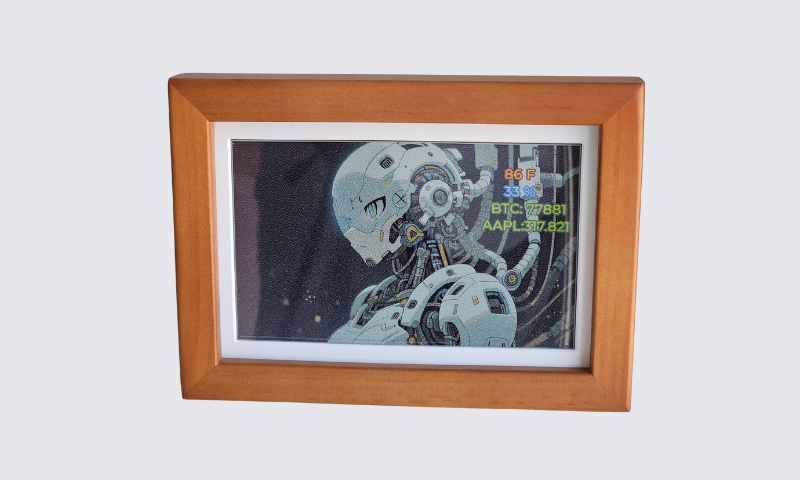
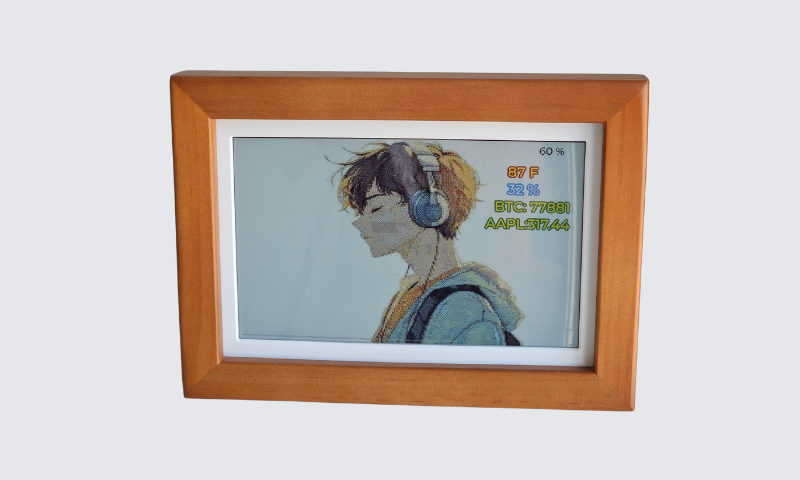
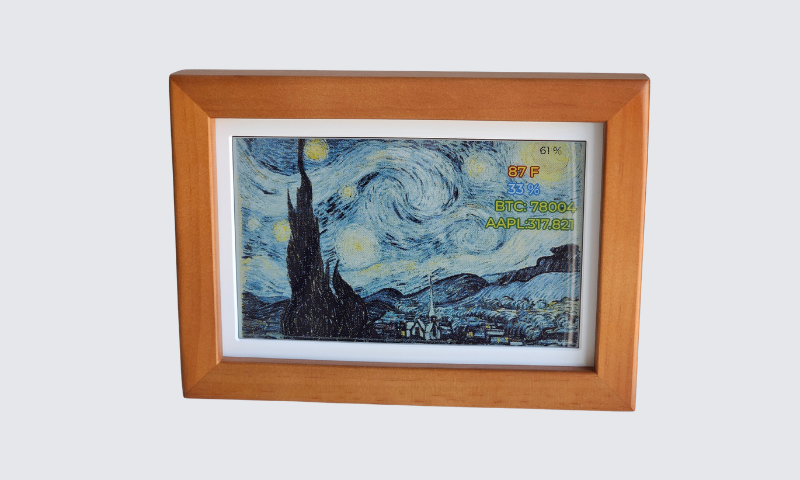
This project demonstrates how R1BBIT firmware can transform the Waveshare ESP32-S3-PhotoPainter into a smart, connected digital photo frame with live sensor data, market prices, battery monitoring, and power-saving features.
The project uses the PhotoPainter’s 800×480 Spectra 6-color e-paper display to show images together with useful real-time information. Images can be loaded from three different sources: the ESP32’s internal Flash memory, a microSD card, or directly from the R1BBIT server.
The built-in SHTC3 sensor measures temperature and humidity, while the device also monitors and displays the current battery level. Using R1BBIT’s HTTP and JSON functions, the project retrieves online market data and displays live prices such as Bitcoin (BTC) and AAPL directly on the e-paper screen.
R1BBIT makes it possible to combine sensors, cloud data, images, storage, and display widgets in one simple R1BASIC program without building a complex ESP32 application from scratch.
To reduce power consumption, the device can automatically enter deep sleep between updates, making it suitable for battery-powered operation.
This project is a great example of how R1BBIT can turn an ESP32-S3 display into a smart photo frame, information dashboard, market monitor, or connected IoT display with only a small amount of readable code.