Learn how to flash and get started with any ESP32 board here.
ESP32-S3 Reflective LCD Photo Frame with Live Sensor Data and Audio
This project demonstrates how to build a smart low-power desktop display using an ESP32-S3, a 4.2-inch reflective ST7305 LCD, the R1BBIT firmware, and just a few lines of R1BASIC code.
The device continuously displays animated artwork together with live environmental information while playing audio streamed from the R1BBIT server. It combines graphics, sensors, audio, battery monitoring, buttons, and external storage into a single compact ESP32 application.
Project Overview
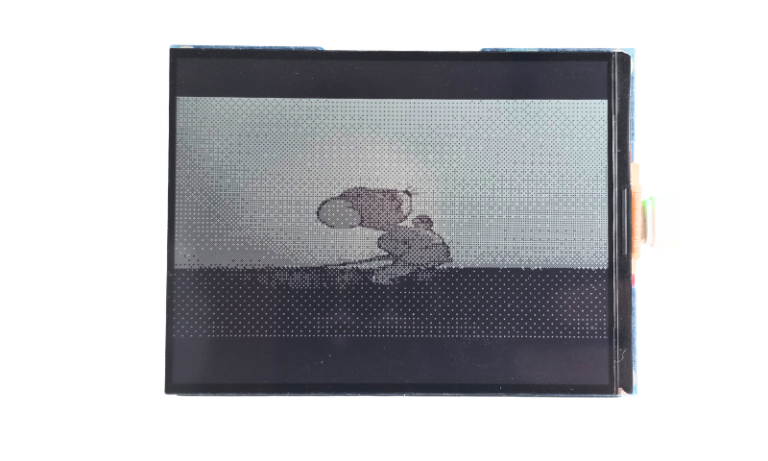
The reflective 400×300 ST7305 LCD is ideal for always-on information displays because it remains clearly visible in ambient light without requiring a traditional backlight. In this project, the screen becomes a digital photo frame capable of showing animations while simultaneously displaying the current temperature and humidity.
The ESP32-S3 runs R1BBIT directly, allowing the entire application to be created without a traditional Arduino or ESP-IDF development workflow. Once the firmware is installed, the project is written in R1BASIC and uploaded instantly.
Animated Display
The main screen continuously renders an animated image from the R1BBIT media library using the command:
DISPLAY_BITMAP("@anim3", 0, 0, 400, 300)
The animation fills the entire 4.2-inch display, creating a living digital artwork while preserving enough space for useful information overlays.
Because R1BBIT supports server-hosted media, images and animations can easily be updated without rebuilding the firmware. New content can simply be uploaded to the server and displayed by name.
Live Temperature and Humidity
The board includes an SHTC3 temperature and humidity sensor connected through the I²C bus.
The sensor is initialized with automatic updates every second:
SHTC3_INIT(temp, hum, 1000)
R1BBIT continuously refreshes the variables in the background, and the latest values are drawn directly onto the display.
The screen always shows:
- Current temperature in Fahrenheit
- Current relative humidity in percent
This makes the device useful not only as a decorative photo frame but also as a practical environmental monitor for a desk, office, bedroom, or living room.
Audio Playback
The project also demonstrates integrated audio using the onboard ES8311 audio codec.
Audio is streamed directly from the R1BBIT server with:
PLAY_AUDIO("@R1BBIT", 128)
The playback volume is configured independently, allowing the device to function as a multimedia display capable of combining visuals and sound in one compact ESP32 project.
Display Technology
The project uses a 4.2-inch ST7305 reflective LCD with a resolution of 400 × 300 pixels.
Unlike traditional TFT displays, reflective LCD technology is designed for excellent visibility under ambient lighting while consuming very little power. This makes it especially suitable for long-running battery-powered projects and always-visible desktop information displays.
The display is refreshed using the R1BBIT canvas system and a single update command:
DISPLAY_UPDATE
This keeps the rendering workflow simple while allowing graphics, text, and animations to be combined on the same screen.
SD Card Support
The device includes a microSD card connected through the 1-bit SDMMC interface.
The SD card can be used to store additional resources such as:
- Images
- Bitmap artwork
- Animations
- Audio files
- Project data
This allows large media collections to be used without consuming the ESP32’s internal flash memory.
Built-In Hardware
This project takes advantage of several onboard peripherals available on the ESP32-S3 device:
- 4.2-inch reflective ST7305 LCD
- ESP32-S3 processor
- SHTC3 temperature and humidity sensor
- ES8311 audio codec
- Built-in speaker amplifier
- Microphone input
- microSD card slot
- KEY button
- BOOT button
- Battery voltage monitoring through ADC
- USB Type-C programming interface
- I²C, SPI, I²S, and GPIO expansion
All of these peripherals are configured inside a single R1BBIT CONFIG section, making the hardware initialization easy to understand and reproduce.
How It Works
After powering on the device, R1BBIT initializes the display, I²C peripherals, SD card, audio codec, and sensor automatically.
The application then enters an infinite loop where it performs the following operations:
- Displays the animated artwork.
- Reads the latest temperature value.
- Reads the latest humidity value.
- Draws both values over the animation.
- Refreshes the reflective LCD.
- Waits one second before updating again.
The result is a smooth multimedia information display created with a remarkably small amount of code.
Why R1BBIT?
This project highlights one of the main goals of the R1BBIT ecosystem: making ESP32 development much faster and more accessible.
Instead of configuring multiple libraries for the display, sensor, audio codec, SD card, and graphics engine, everything is initialized through simple high-level commands.
The developer can focus on the project itself rather than the complexity of embedded software infrastructure.
With R1BBIT, the same hardware can easily become a digital photo frame, weather display, multimedia player, smart desk clock, environmental monitor, or fully customized IoT display by changing only the script.
CONFIG
// ── Display: reflective 4.2" ST7305, 400x300 ──
DISPLAY_DRIVER ST7305
SPI_MOSI 12
SPI_CLK  11
SPI_FREQ 20000000
DISPLAY_CS  40
DISPLAY_DC  5
DISPLAY_RST 41
DISPLAY_W 400
DISPLAY_H 300
// ── I2C0: ES8311 0x18, ES7210 0x40, PCF85063 0x51, SHTC3 0x70 ──
I2C_SDA 13
I2C_SCL 14
I2C_FREQ 400000
// ── SD card: SDMMC, 1-bit data mode ──
SD_BUS MMC
SDMMC_WIDTH 1
SDMMC_CLK 38
SDMMC_CMD 21
SDMMC_D0  39
// ── Audio: ES8311 codec, speaker through built-in amplifier ──
CODEC ES8311
CODEC_ADDR 0x18
CODEC_PA_PIN 46
AUDIO_OUT CODEC
AUDIO_IN  CODEC
I2S_MCLK 16
I2S_BCLK 9
I2S_WS   45
I2S_DOUT 8
I2S_DIN  10
I2S_FREQ 16000
CODEC_PA_ACTIVE_LOW 0
// ── Buttons and battery ──
IN1 18 KEY
IN1_PULL UP
IN2 0 BOOT
IN2_PULL UP
ADC_IN1 4 VBAT
ADC_IN1_ATTEN 11
TIMEZONE 0
UNITS IMPERIAL
END_CONFIG
// Variables for the SHTC3 sensor
VAR temp
VAR hum
// Initialize the sensor (updates temp and hum every 2 seconds)
SHTC3_INIT(temp, hum, 1000)
// Initialize the display
DISPLAY_INIT
DISPLAY_INIT_CANVAS(0,0,400,300)
PLAY_AUDIO("@R1BBIT",128)
AUDIO_VOLUME(40)
WHILE 1
    DISPLAY_BITMAP("@anim3",0,0,400,300)
    // Display temperature and humidity
    DISPLAY_TEXT(10, 10, temp.0 + " F", 0x000000, 24)
    DISPLAY_TEXT(10, 35, hum.0 + " %", 0x000000, 24)
    // Display the frame
    DISPLAY_UPDATE
    PAUSE 1000
WEND
// End of infinite loop
Upload and run the program on the device.