In this project, we demonstrate how to send data from one ESP32 device to another through the R1BBIT Server.
The first ESP32 is connected to an SCD41 sensor, which measures CO₂ concentration, temperature, and humidity. Using the R1BASIC VARIABLE_SET command, the sensor values are sent through the R1BBIT Server to another ESP32 device.
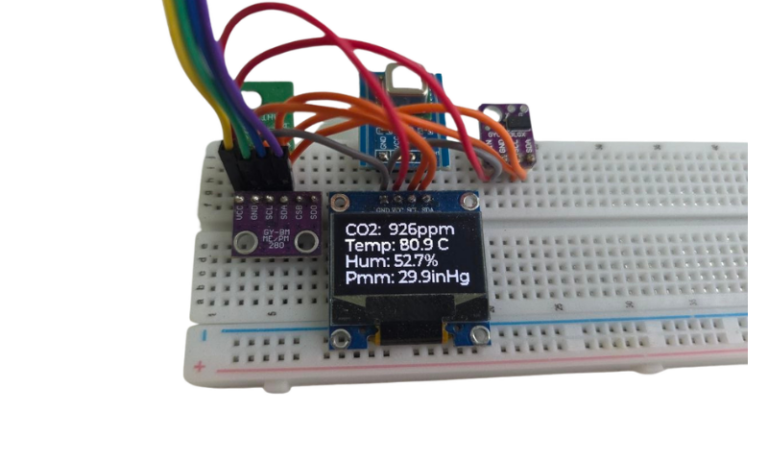
The second ESP32 receives the variables and displays the live data on an SSD1306 OLED display.
This makes it easy to create distributed IoT systems where sensors and displays can be located on different devices — and even in different locations — while exchanging data through the R1BBIT Cloud.
With R1BBIT and R1BASIC, ESP32-to-ESP32 cloud communication can be implemented with just a few lines of simple code.
The first script is for the ESP32 board with the SCD41 sensor connected.
CONFIG
I2C_SDA 6
I2C_SCL 7
I2C_FREQ 400000
UNITS IMPERIAL
END_CONFIG
VAR CO2,T,H
SCD41_INIT(CO2,T,H,500)
WHILE 1
    VARIABLE_SET("471471", "CO2"=CO2)
    VARIABLE_SET("471471", "T"=T)
    VARIABLE_SET("471471", "H"=H)
    PAUSE 500
WEND
The second script is for the ESP32 board with the OLED display connected.
CONFIG
I2C_SDA 5
I2C_SCL 6
I2C_FREQ 400000
DISPLAY_DRIVER   SSD1306
DISPLAY_I2C      0
DISPLAY_I2C_ADDR 0x3C
DISPLAY_WIDTH    128
DISPLAY_HEIGHT   64
UNITS IMPERIAL
END_CONFIG
VAR CO2,T,H
DISPLAY_INIT
WHILE 1
    DISPLAY_CLEAR(#000000)
    DISPLAY_TEXT(0,0,"CO2: "+CO2.0+" ppm",#FFFFFF)
    DISPLAY_TEXT(0,16,"Temp: "+T.1+" F",#FFFFFF)
    DISPLAY_TEXT(0,32,"Hum: "+H.1+" %",#FFFFFF)
    DISPLAY_UPDATE
    PAUSE 500
WEND
Click Upload to Devices → Script Start.
Result:
The first ESP32 reads CO₂ concentration, temperature, and humidity from the SCD41 sensor and sends the data to the second ESP32 through the R1BBIT Server.
The second ESP32 receives the data and displays the current CO₂ level, temperature, and humidity on the SSD1306 OLED display.
This demonstrates how two ESP32 devices can exchange real-time data through the R1BBIT Server, even when they are connected to different networks.